根据音源的不同,有声读物中可能包含来自多张 CD 的数百个文件。
每张 CD 都有自己的曲目编号,这意味着整张专辑中可能会出现几首名称相同的曲目。
对于某些音频播放器来说,正确播放音频顺序简直是噩梦。
Track Entitler只是提供了根据曲目编号自动命名曲目的功能。
过程
- 请确保所有文件的音轨编号正确且按顺序排列。
- 选择所有要重新命名的曲目。
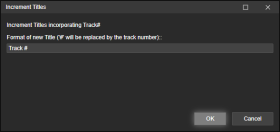
- 右键单击“编辑标签” (或使用“工具”> “编辑标签” ),然后选择“递增标题” 。
- 添加您希望新标题的文字。
字符#将被替换为曲目编号。
示例
追踪 #
第一首
第二轨
第三首
...
新月 #102
新月 1/102
新月 2/102
新月 3/102
...
Depending on your source - you may have hundreds of files in an audiobook from several CDs.
Each CD its own track numbers, which means you may end up with several identically named tracks in the entire album.
A nightmare for some audio players to gifure out the correct order.Track Entitler merely offers the possiblilty to automatically name the tracks based on the track number.
Process
- Make sure all files have Track Numbers in correct, sequential order.
- Select all tracks you want re-entitled.
- Right-click Edit Tags (or use the Tools > Edit Tags), and select Increment Titles.
- Add the text that you want your newly entitled tracks to have.
The character # will be replaced by the track number.Examples
Track #
Track 1
Track 2
Track 3
...
New Moon # of 102
New Moon 1 of 102
Hide original
New Moon 2 of 102
New Moon 3 of 102
...
By
ConcernedWife
提交者 ConcernedWife
更新 08/10/2025