最新插件
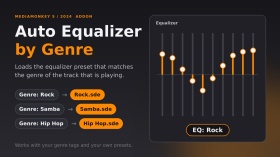
当曲目切换时,系统会根据曲目类型自动加载均衡器预设。预设文件必须位于均衡器文件夹内,文件名必须与曲目类型完全一致(例如,“摇滚”类型 → EqualizerRock.sde)。没有预设文件的曲目类型将保留您当前的均衡器设置。系统支持多种曲目类型(例如“摇滚;流行”):系统会使用第一个包含预设文件的曲目类型。预设文件切换时,会显示一条简短的“EQ: Rock”消息。
已在 MediaMonkey 2024.2.2.3222 (Windows) 上测试。本插件的灵感来源于 DiddeLeeDoo 于 2006 年编写的 AutoEQ.vbs 脚本;它是为 MediaMonkey 5 从零开始编写的原创代码。
葡萄牙语: Carrega 自动或预设均衡器符合或通用。您可以使用预设设置来更改默认值,即意大利面均衡器。
Translated automatically (see original)Automatically loads an equalizer preset when the track changes, based on the track’s genre. The preset must be a file named exactly like the genre inside the Equalizer folder (e.g. genre “Rock” → EqualizerRock.sde). Genres without a preset keep your current equalizer settings. Multiple genres (“Rock; Pop”) are supported: the first one with a preset file is used. A short “EQ: Rock” message shows when the preset changes.
Tested on MediaMonkey 2024.2.2.3222 (Windows). Inspired by the 2006 script AutoEQ.vbs by DiddeLeeDoo; this addon is original code written from scratch for MediaMonkey 5.
Em português: carrega automaticamente o preset do equalizador conforme o gênero da faixa. O arquivo do preset deve ter o mesmo nome do gênero, dentro da pasta Equalizer.
Hide original
By
Fernando Santos & Claude
提交者 FernandoSantos
更新 14/10/2026
版本历史/详细信息
- 版本:
- 1.1
- 更新:
- 14/10/2026
- Size:
- 2.99 KB
- 执照:
- MIT (permite usar e modificar, mantendo os crédito
- 适用于:
- Media Monkey 2024.2
- 变化:
Version 1.1.0 - first public release.
- Automatically loads the equalizer preset that matches the track's genre (Equalizer<Genre>.sde).
- Finds the Equalizer folder on its own (no fixed paths).
- Genres without a preset keep your current EQ (the file is checked first, because loading a missing preset resets the EQ to flat).
- Multiple genres (Rock; Pop) supported: the first one with a preset is used.
- Short "EQ: <preset>" message that disappears on its own.
Tested only on MediaMonkey 2024.2.2.3222 (Windows).Versão 1.1.0 - primeira versão pública.
- Carrega automaticamente o preset do equalizador correspondente ao gênero da faixa (Equalizer<Gênero>.sde).
- Encontra a pasta Equalizer sozinho (sem caminhos fixos).
- Gêneros sem preset mantêm o seu EQ atual (o arquivo é verificado antes, pois carregar um preset inexistente zera o EQ).
- Vários gêneros (Rock; Pop): usa o primeiro que tiver preset.
- Aviso rápido "EQ: <preset>" que some sozinho.
Testado apenas no MediaMonkey 2024.2.2.3222 (Windows).
专辑评分节点会在您的收藏中添加一个“专辑评分”子节点。它会根据专辑评分(从 5 星到 0.5 星,以及“炸弹”和“未知”)对收藏中的专辑进行分组,这样您就可以一目了然地浏览评分最高和最低的专辑,类似于现有的曲目评分节点,但它是基于专辑的。
重要提示:启用此节点需要 MediaMonkey Gold 许可证。子节点在收藏集设置中启用,编辑或创建收藏集是 Gold 功能(免费版本会显示 Gold 注册对话框)。
Translated automatically (see original)Album Rating Node adds an "Album Rating" sub-node to your collections. It groups the albums of a collection by their album rating (5 stars down to 0.5 stars, bomb and Unknown), so you can browse your best and worst rated albums at a glance, similar to the existing Rating node for tracks, but based on albums.
IMPORTANT: Enabling the node requires a MediaMonkey Gold license. The sub-node is switched on in the collection settings, and editing or creating collections is a Gold feature (the free version shows the Gold registration dialog instead).
Hide original
By
AI (inspired by Fetzenschaedl)
提交者 fetzenschaedl
更新 11/10/2026
Cover Browser用一个扩展的查看器取代了 MediaMonkey 默认的单封面预览,该查看器允许用户循环浏览和检查曲目或专辑的所有嵌入式封面(正面、背面、小册子页面、光盘等)。
主要特点
多封面导航:使用箭头键、屏幕按钮或鼠标滚轮(可选环绕式)翻阅所有封面。
详细信息栏:显示封面计数器位置、封面类型、像素/文件大小和存储位置。
图像控件:
旋转:旋转 90°(非常适合扫描小册子页面)。
缩放和平移: 25% 至 400% 缩放,可通过点击和拖动进行平移。
窗口适应图像:调整窗口大小并重新定位窗口,使其与封面的宽高比相匹配,而不会跨越任务栏边界。
PDF小册子支持:直接在查看器中显示嵌入式PDF小册子。
自动隐藏界面:鼠标无操作时工具栏自动淡出。
安全回退:如果只有一个封面存在或加载失败,则运行方式与默认视图相同。
已知局限性
专辑视图范围:对于专辑,仅显示第一首曲目的封面。
PDF限制: PDF小册子无法使用此插件的自定义旋转、缩放或窗口适应工具(而是使用内置的PDF查看器工具)。对PDF图稿的支持也取决于MediaMonkey版本。
缩放旋转对齐:放大时旋转 90°/270° 可能会略微偏离中心。
Cover Browser replaces MediaMonkey default single-cover preview with an extended viewer that allows users to cycle through and inspect all embedded covers (front, back, booklet pages, discs, etc.) for a track or album.
Key Features
Multi-Cover Navigation: Flip through all covers using arrow keys, on-screen buttons, or the mouse wheel (with optional wrap-around).
Detailed Info Bar: Displays cover counter position, cover type, pixel/file size, and storage location.
Image Controls:
Rotate: 90° rotation (ideal for scanned booklet pages).
Zoom & Pan: 25% to 400% zoom with click-and-drag panning.
Fit Window to Image: Resizes and repositions the window to match the cover's aspect ratio without crossing taskbar boundaries.
PDF Booklet Support: Displays embedded PDF booklets directly within the viewer.
Auto-Hiding UI: Toolbar automatically fades out during mouse inactivity.
Safe Fallback: Operates like the default view if only one cover is present or if loading fails.
Known Limitations
Hide original
Album View Scope: For albums, only covers belonging to the first track are displayed.
PDF Restrictions: PDF booklets cannot use the add-on's custom rotate, zoom, or window-fitting tools (uses built-in PDF viewer tools instead). Support for PDF artwork also depends on the MediaMonkey version.
Zoom Rotation Alignment: 90°/270° rotation while zoomed in may appear slightly off-center.
By
AI (Inspired by Fetznschaedl)
提交者 fetzenschaedl
更新 06/10/2026
版本历史/详细信息
- 版本:
- 0.5.1
- 更新:
- 06/10/2026
- Size:
- 59.81 KB
- 适用于:
- Media Monkey 2024 - 2027
- 变化:
What's New in 0.5.1
-
Automatic Window Fitting & Centering: Dynamically resizes the window to match cover dimensions while browsing, with flexible options to center the window relative to your monitor or keep its previous position, optimized for multi-monitor setups with seamless, flicker-free image loading.
-
Background Duplicate Detection: Automatically filters out duplicate covers (e.g., matching embedded tag images and folder files) in the background without freezing the UI or delaying image displays.
-
Enhanced Folder Scanning & UI Feedback: Better handling of large image folders with configurable display limits, validated settings, and clear status indicators (such as ... and +) to show when background scanning is underway.
-
- 版本:
- 0.2
- 更新:
- 29/09/2026
- Size:
- 36.64 KB
- 适用于:
- Media Monkey 2024 - 2027
- 变化:
Version 0.2.0
-
Folder Files Integration: Automatically appends images and optionally PDFs from the track's folder, subfolders, and parent folder to the cover list for browsing (requires MediaMonkey 5.0.4+). Adds configurable options for inclusion and depth/file limits.
-
Duplicate Prevention: Skips folder files that duplicate existing tag covers based on file path and storage details.
-
UI & Display Enhancements: The info bar now displays Folder, pixel dimensions, file size, and relative path. Works fully even when showing a folder file without tagged covers.
Version 0.1.3
-
Reworked Zoom System: Changed zoom percentages to reflect original pixel dimensions (100% = actual size) using fixed levels (10% to 800%). Smooth transitions from "Fit" mode without sudden jumps.
-
Center Anchor & Quality: Zooming now retains the current view's center point, and maximum source resolution was increased to 5000 px for crisp viewing of high-res covers.
-
New Shortcut: Added shortcut key 1 to jump directly to actual size (100%).
-
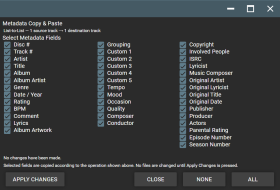
元数据复制和粘贴功能为 MediaMonkey 5 Mobile 带来了灵活的元数据复制和粘贴功能。
使用以下四种传输模式,从一个或多个源轨道复制选定的元数据,并将其粘贴到一个或多个目标轨道:
• 一对一
• 列表到列表
• 一对多
• 多对一
详细的字段选择屏幕允许您精确选择要传输的元数据字段,包括艺术家、标题、专辑、专辑艺术家、流派、日期/年份、评分、BPM、评论、歌词、作曲家、指挥家、出版商、制作人、自定义字段和其他受支持的曲目元数据。
专辑封面也可以选择进行传输,可以与元数据一起传输,也可以单独传输。
该插件旨在提供类似于 MediaMonkey 4 的高级重复查找和修复中的复制元数据/粘贴元数据功能的功能,并针对 MediaMonkey 5 Mobile 进行了调整。
Translated automatically (see original)Metadata Copy & Paste brings flexible metadata copying and pasting to MediaMonkey 5 Mobile.
Copy selected metadata from one or more source tracks and paste it to one or more destination tracks using four transfer modes:
• One-to-One
• List-to-List
• One-to-Many
• Many-to-OneThe detailed field-selection screen lets you choose exactly which metadata fields to transfer, including Artist, Title, Album, Album Artist, Genre, Date/Year, Rating, BPM, Comment, Lyrics, Composer, Conductor, Publisher, Producer, custom fields, and other supported track metadata.
Album Artwork can also be selected for transfer, either together with metadata or independently.
The addon is designed to provide functionality similar to the Copy Metadata / Paste Metadata features found in MediaMonkey 4's Advanced Duplicate Find & Fix, adapted for MediaMonkey 5 Mobile.
Hide original
By
Project 37
提交者 Project37
更新 21/09/2026
版本历史/详细信息
- 版本:
- 3.3.3
- 更新:
- 21/09/2026
- Size:
- 4.68 KB
- 执照:
- None
- 适用于:
- Media Monkey V2024.2.2 - V2024.2.2.3222
- 变化:
Version 3.3.3
Right click on a file and scroll down to "Edit tags" and then the popup screen will list "Copy Metadata" & "Paste Metadata" options.
• Added Album Artwork as a selectable transfer option.
• Album Artwork can be copied together with selected metadata or transferred independently.
• Album Artwork works with One-to-One, List-to-List, One-to-Many, and Many-to-One operations.
• Added support for transferring artwork across multiple source and destination tracks.
• Preserved the detailed metadata field-selection interface and existing transfer functionality.
• Tested on MediaMonkey 5 Mobile.

通过语音播报和大字叠加显示正在播放的曲目名称和艺术家。我创建这个小项目是为了在听歌时记住我DJ曲目的名称,这样在制作DJ set时就能更方便地找到它们。
Translated automatically (see original)Announces the playing track title and artist via text-to-speech and large text overlay. This pet project was created as a means of learning the names of my DJ tracks as I listen to them so I can go back to them more readily when I am making a DJ set.
Hide original
By
MicroRaveNZ
提交者 MicroRaveNZ
更新 21/09/2026
版本历史/详细信息
- 版本:
- 1.0.8
- 更新:
- 21/09/2026
- Size:
- 6.75 KB
- 适用于:
- Media Monkey 5.0
- 变化:
Announces the playing track title and artist via text-to-speech and large text overlay. This pet project was created as a means of learning the names of my DJ tracks as I listen to them so I can go back to them more readily when I am making a DJ set.