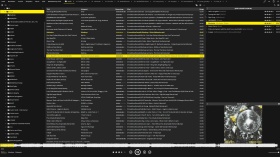
这是基于 IBM Carbon 灰度调色板的 Flat Monkey 皮肤的深色版本,选项中还包含一个免费的强调色选择器。此版本为 Ventis Media 出品的 Flat Monkey 的非官方衍生版本,完全免费。
Flat Monkey Dark 重新设计了 Flat Monkey 的外壳,采用了 IBM Carbon 的灰度调色板:窗口 #161616,面板 #262626,边框 #393939,文本 #f4f4f4。整个用户界面均为单色灰色,只有一抹亮色,您可以自行选择作为点缀。
与原版固定的主题选项(深色或浅色,橙色或蓝色)不同,新版在“工具”>“选项”>“皮肤”中提供了一个自由选择强调色的选项。默认颜色为向日葵黄 (#FFE000),但它是一个真正的颜色选择器,因此任何颜色都可以使用。强调色会影响播放器高亮显示、当前播放曲目、进度条和音量滑块、热链接、进度波形以及选中行。强调色表面上的文本、评分星级和图标会在深色和浅色之间自动切换,因此无论您选择什么颜色,都能保持清晰易读,并且内置的可读性保护机制会阻止选择不清晰的颜色。
与原版相比,其他改动包括:选中的行在每个窗格中都使用完整的强调色,鼠标悬停时不再出现灰色闪烁;窗格失去焦点时,选中的行仍然可见;标题栏和面板由圆角改为方形;面包屑导航栏被隐藏,使主窗口更简洁;新增了尺寸选项(小/正常/大)。其他所有内容(布局、图标、字体、行为)均与 Flat Monkey 保持一致。
安装方法:下载 Flat Monkey Dark.mmip 文件,然后在 MediaMonkey 中依次点击“工具”>“插件”>“添加”,选择该文件。之后,在“工具”>“选项”>“布局/皮肤”中选择该皮肤。
这是 Flat Monkey (c) Ventis Media, Inc. 的非官方衍生作品,经修改后根据 Ventis Limited Reciprocal License 分享,该许可明确允许制作衍生皮肤。本作品与 Ventis Media 无任何关联,亦未获得其认可或支持。此皮肤免费,无付费版本,且无任何烦人的提示。
源代码和问题跟踪器:https://github.com/junkerderprovinz/flat-monkey-dark
Translated automatically (see original)A dark-only reshell of the bundled Flat Monkey skin in the IBM Carbon greyscale palette, with a free accent colour picker right in the options. Unofficial derivative of Flat Monkey by Ventis Media, completely free.
Flat Monkey Dark re-shells Flat Monkey in the IBM Carbon greyscale palette: window #161616, panels #262626, borders #393939, text #f4f4f4. The whole UI is monochrome grey, dark only, and the single splash of colour is an accent you pick yourself.
Instead of the original's fixed theme choices (dark or light, orange or blue) there is one free accent colour picker in Tools > Options > Skin. The default is sunflower yellow (#FFE000), but it is a real colour picker, so any colour works. The accent drives the player highlight, the now-playing track, the progress and volume sliders, hotlinks, the seek waveform and the selected rows. Text, rating stars and icons on accent surfaces switch automatically between dark and light, so whatever colour you pick stays readable, and a built-in readability guard blocks choices that would not.
Other changes compared to the original: selected rows use the full accent colour in every pane with no grey flash on hover, the selection stays visible when a pane loses focus, title bars and panels are square instead of rounded, the breadcrumb path bar is hidden for a cleaner main window, and there is a size option (Small / Normal / Large). Everything else (layout, icons, fonts, behaviour) is Flat Monkey unchanged.
Install: download Flat Monkey Dark.mmip, then in MediaMonkey go to Tools > Add-ons > Add and pick the file. After that, select the skin under Tools > Options > Layout / Skin.
This is an unofficial derivative of Flat Monkey (c) Ventis Media, Inc., modified and shared under the Ventis Limited Reciprocal License, which explicitly permits derivative skins. It is not affiliated with, endorsed by or supported by Ventis Media. The skin is free, with no paid version and no nags.
Source code and issue tracker: https://github.com/junkerderprovinz/flat-monkey-dark
Hide original
By
Junker der Provinz
提交者 junkerderprovinz
更新 02/07/2026
版本历史/详细信息
- 版本:
- 1.1
- 更新:
- 02/07/2026
- Size:
- 391.93 KB
- 执照:
- Ventis Limited Reciprocal License
- 适用于:
- Media Monkey 5.0.2 - 2024.9999
- 变化:
Initial public release (v1.1.0).
Dark-only IBM Carbon reshell of the bundled Flat Monkey skin: the whole UI goes neutral dark grey (window #161616, panels #262626, text #f4f4f4) and the single splash of colour is yours to pick.
- Free accent colour picker in Tools > Options > Skin (default sunflower #FFE000), with a readability guard
- Auto-contrast text, rating stars and icons on any accent (dark on light accents, light on dark ones)
- Uniform accent selection in every pane, in both focus states, no grey flash on hover
- Seek waveform in the exact accent colour
- Square title bars and panels, hidden breadcrumb bar, size option (Small / Normal / Large)Unofficial derivative of Flat Monkey (c) Ventis Media, Inc., under the Ventis Limited Reciprocal License. Free.